Title here
Summary here
February 21, 2026 by Eirik Rolland Enger21 minutes
A homage to mise-en-place
TL;DR
Install a new project from paper-publishing-process with
curl -fsSL https://raw.githubusercontent.com/engeir/paper-publishing-process/main/INSTALL.sh | shmain.pdf, review-<git-tag>.pdf and diff-<git-tag>.pdfA frustration from when I first started writing papers to be submitted to journals and go through a review cycle was keeping track of which version was submitted at which point in time. Which version should I respond to, which version should the updated version be diffed against? This was a very manual process where the work of tracking what needed to be submitted in the latest revision sometimes felt as large as the writing itself.
Fortunately, there are solutions.
Everything should be able to live independently of the system you first develop on, so
we create a Git repo where all the files can live. In this guide we will make extensive
use of GitHub’s workflow, so we create the repo there. I
called mine paper-publishing-process, so let’s clone it down:
git clone git@github.com:engeir/paper-publishing-process.git
cd paper-publishing-process
Next we need to be able to install all software, and for that we use mise. First we must install mise; visit the website, or run the following command:
curl https://mise.run | shThen we create the file mise.toml in the project root:
[tools."github:rstudio/tinytex-releases"]
asset_pattern = "TinyTeX-1-*.tar.gz"
bin_path = ".TinyTeX/bin/x86_64-linux"
version = "latest"
[tools]
"github:WGUNDERWOOD/tex-fmt" = "latest"
"github:orhun/git-cliff" = "latest"
hk = "latest"
"pipx:bibfish" = "latest"
pkl = "latest"
We need to give mise permission to use it, mise trust, before
installing everything with mise install.
In the first commit I added a simple license file (MIT) and a .gitignore suited for
TeX development.
→ See commit ce3150c.
While we’re at it, let’s add some files that help keep the repo up to a good standard in terms of formatting:
tex-fmt.toml: Formatting of .tex and .bib.taplo.toml: Formatting of .toml.yamlfmt.yml: Formatting of .ymlhk.pkl: Formatting and lintingThis change also updates mise.toml and creates the file tex/main.tex.
→ See commit b161e41.
We can verify that everything so far is as it should be:
$ git --no-pager reflog
b161e41 (HEAD -> main, origin/main, origin/HEAD) HEAD@{0}: commit: feat(format): first working tex file with formatting
ce3150c HEAD@{1}: commit: build(mise): install basic tools
4dd90d7 HEAD@{2}: clone: from github.com:engeir/paper-publishing-process.git
$ hk check
hk 1.38.0 by @jdx – check  [==========================================] 1/1
✔ files - Fetching modified files (0 files)
✔ bib-filepath

bib-filepath stderr:
[check-bib-filepath] $ #!/usr/bin/env bash
$ hk fix
hk 1.38.0 by @jdx – fix  [============================================] 1/1
✔ files - Fetching modified files (0 files)
✔ bib-filepath

bib-filepath stderr:
[fix-bib-filepath] $ #!/usr/bin/env bashWe are now ready to work on the TeX files! We want to write in tex/main.tex, and every
time we save, the PDF should update automatically. We turn again to
mise for this functionality.
→ See commit e7127b4.
We can now run
$ mise watch main:compile
[Running: /home/eirikre/.local/bin/mise run main:compile]
[main:update-refs] $ bibfish -c 'cite,citet,citep,citeA' -f main.tex .bib main.bib
Traceback (most recent call last):
  File "/home/eirikre/.local/share/mise/installs/pipx-bibfish/0.3.4/bin/bibfish", line 6, in <module>
    sys.exit(cli())
             ~~~^^
It fails! This is due to the first, slightly special choice we make in this workflow.
In order to keep the .bib files in the repo as minimal as possible, they are all
generated from a local “master reference file”. This file is what the LOCAL_BIB_PATH
value we added in mise.toml points to. This master reference is intended to be a file
that lives only locally, not in the Git repo, and should be able to supply references
not just to this project, but to all your TeX projects! Bibfish will then read it and
generate a reference file based only on the references found in a given TeX file.
Bibfish supports most common citation formats (e.g. \cite, \citet, etc.), but can
easily be extended with custom formats. In mise.toml we have added citeA, and also
specify cite, citet and citep
(bibfish -c 'cite,citet,citep,citeA' -f main.tex {{ env.LOCAL_BIB_PATH }}.bib main.bib).
Let’s fix the error from before by
mise.local.toml to .gitignoremise.local.tomlLocal bib file
Note that the local file’s location must either be “absolute” (/home/user/the-file),
or “relative” from the tex folder, and that it is specified without .bib.
I also added the local master reference here to illustrate with a minimal example, but normally I would place it outside the repo. Also add
[env]
LOCAL_BIB_PATH = "../main-ref"@article{enger2025:paper1,
author = {Enger, Eirik Rolland and Graversen, Rune and Theodorsen, Audun},
title = {{Saturation in Forcing Efficiency and Temperature Response of Large Volcanic Eruptions}},
journal = {Journal of Geophysical Research: Atmospheres},
volume = {130},
number = {9},
pages = {e2024JD041098},
keywords = {super-eruption, AOD, ERF, temperature response},
doi = {10.1029/2024JD041098},
url = {https://agupubs.onlinelibrary.wiley.com/doi/abs/10.1029/2024JD041098},
eprint = {https://agupubs.onlinelibrary.wiley.com/doi/pdf/10.1029/2024JD041098},
note = {e2024JD041098 2024JD041098},
abstract = {Abstract Volcanic eruptions cause climate cooling due to the reflection of solar radiation by emitted and subsequently produced aerosols. The climate effect of an eruption may last for about a decade and is nonlinearly tied to the amount of injected SO2 \${\text{SO}}\_{2}\$ from the eruption. We investigate the climatic effects of volcanic eruptions, ranging from Mt. Pinatubo-sized events to supereruptions. The study is based on ensemble simulations in the Community Earth System Model Version 2 (CESM2) climate model applying the Whole Atmosphere Community Climate Model Version 6 (WACCM6) atmosphere model, using a coupled ocean and fixed sea surface temperature setting. Our analysis focuses on the impact of different levels of SO2 \${\text{SO}}\_{2}\$ injections on stratospheric aerosol optical depth (SAOD), effective radiative forcing (ERF), and global mean surface temperature (GMST) anomalies. We uncover a notable time-dependent decrease in aerosol forcing efficiency (ERF normalized by SAOD) for all eruption SO2 \${\text{SO}}\_{2}\$ levels during the first posteruption year. In addition, it is revealed that the largest eruptions investigated in this study, including several previous supereruption simulations, provide peak ERF anomalies bounded at −65Wm−2 \${-}65\,\mathrm{W}\,{\mathrm{m}}^{-2}\$. Further, a close linear relationship between peak GMST and ERF effectively bounds the GMST anomaly to, at most, approximately −10K \${-}10\,\mathrm{K}\$. This is consistent across several previous studies using different climate models.},
year = {2025}
}
@article{enger2025:paper2,
author = {Enger, Eirik Rolland and Graversen, Rune and Theodorsen, Audun},
title = {{Nonparametric Estimation of Temperature Response to Volcanic Forcing}},
journal = {Journal of Geophysical Research: Atmospheres},
volume = {130},
number = {10},
pages = {e2024JD042519},
keywords = {temperature response, super-eruption, radiative forcing, aerosol, AOD, ERF},
doi = {10.1029/2024JD042519},
url = {https://agupubs.onlinelibrary.wiley.com/doi/abs/10.1029/2024JD042519},
eprint = {https://agupubs.onlinelibrary.wiley.com/doi/pdf/10.1029/2024JD042519},
note = {e2024JD042519 2024JD042519},
abstract = {Abstract Large volcanic eruptions strongly influence the internal variability of the climate system. Reliable estimates of the volcanic eruption response as simulated by climate models are needed to reconstruct past climate variability. Yet, the ability of models to represent the response to both single-eruption events and a combination of eruptions remains uncertain. We use the Community Earth System Model version 2 along with the Whole Atmosphere Community Climate Model version 6, known as CESM2(WACCM6), to study the global-mean surface temperature (GMST) response to idealized single volcano eruptions at the equator, ranging in size from Mt. Pinatubo-type events to supereruptions. Additionally, we simulate the GMST response to double-eruption events with eruption separations of a few years. For large idealized eruptions, we demonstrate that double-eruption events separated by 4 years combine linearly in terms of GMST response. In addition, the temporal development is similar across all single volcanic eruptions injecting at least 400 Tg \$\left({\mathrm{S}\mathrm{O}}\_{2}\right)\$ into the atmosphere. Because only a few eruptions in the past millennium occurred within 4 years of a previous eruption, we assume that the historical record can be represented as a superposition of single-eruption events. Hence, we employ a deconvolution method to estimate a nonparametric historical GMST response pulse function for volcanic eruptions, based on climate simulation data from 850 to 1850 taken from a previous study. By applying the estimated GMST response pulse function, we can reconstruct most of the underlying historical GMST signal. Furthermore, the GMST response is significantly perturbed for at least 7 years following eruptions.},
year = {2025}
}→ See commit a149cdf.
When we now try to compile, no error!
$ mise watch main:compile
[Running: /home/eirikre/.local/bin/mise run main:compile]
[main:update-refs] $ bibfish -c 'cite,citet,citep,citeA' -f main.tex ../main-ref.bib main.bib
[main:compile] $ latexmk -pdf -g -f -silent -recorder- main.tex
Rc files read:
  NONE
Latexmk: Run number 1 of rule 'pdflatex'
This is pdfTeX, Version 3.141592653-2.6-1.40.29 (TeX Live 2026) (preloaded format=pdflatex)
 restricted \write18 enabled.
entering extended mode
Latexmk: Getting log file 'main.log'
Latexmk: Using bibtex to make bibliography file(s).

mise WARN  task main:compile did not generate expected output: main.bbl
Finished in 906.8ms
[Command was successful]
^C%
$ ls tex
main.aux main.bib main.fdb_latexmk main.log main.pdf main.texLet’s add some references.
 1\documentclass{article}
 2
 3\author{Eirik Rolland Enger}
 4\title{A dead simple paper publishing workflow}
 5
 6\begin{document}
 7
 8\maketitle
 9
10Hello, World!
11
12\section{Adding references}
13
14See \cite{enger2025:paper1}.
15
16\bibliographystyle{plain}
17\bibliography{../main-ref}
18
19\end{document}
We also create a general compile task in mise:
13[env]
14LOCAL_BIB_PATH = "" # override in mise.local.toml with your personal global bib path
15
16[tasks.compile]
17description = "Compile all documents for local development."
18dir = "{{ config_root }}/tex/"
19run = [{ task = "localize-bib-paths" }, { task = "*:compile" }]
20
21[tasks."main:compile"]
22depends = ["main:*"]
When we now run mise watch compile a new file will be generated: tex/main.bbl. This
is normally ignored, but we will need it in the future, so we remove it from
.gitignore.
It contains a new .bbl file, and the .bib file has been updated with exactly one
reference — the one we added in tex/main.tex!
→ See commit 1a523ea.
We use tinytex as the TeX distribution in this project. As the name suggests it is much smaller than the more common TeX-live/TeX-live-full. This also means we will more often find that packages are unavailable, but in return we get more control. Let’s use a handful of packages not found in TinyTeX.
→ See commit
fe28c24 for updated
tex/main.tex and mise.toml.
If you first update tex/main.tex with the contents from the commit above and have
mise watch compile running it should fail, complaining that underscore is not
available. Then add the postinstall hook in mise.toml and run mise install.
This will ensure that various packages are installed via tlmgr. The advantage of this
setup is that many journals are very particular about which packages they accept. If you
have written a long manuscript that uses many packages and compiles fine locally because
you used TeX-live-full, it can quickly become difficult to figure out what needs to go
if compilation on the journal’s server crashes.
We have now completed the workflow for local TeX files! Run mise watch compile, write
down all your good ideas, and every time tex/main.tex is saved the compilation will
run. Notice how tex/main.bib updates in the terminal window at the top right when I
add and remove references.
Next steps: automatic compilation on GitHub, support for versioning via Git, and routines for responding to feedback from journals.
Since we have tools for formatting the code as well as a working hk setup, we can easily set up Git commit hooks:
hk installPre-commit vs. mise run compile
Since mise run|watch compile converts all \bibliography{...} to use the local master
reference, while the pre-commit hook via hk converts them to use the generated bib
files, a conflict will arise between them.
Each time you create a commit it is therefore wise to stop mise watch compile, so that
it does not overwrite before you have finished the commit.
To set up CI/CD we create the file mise.ci.toml, as well as three files in
.github/workflows and .mise/tasks:
.github/workflows/build.yml
Compiles all PDFs for every push to the main branch on GitHub.
.github/workflows/fix-bib-filepath.yml
An extra check ensuring the correct bib file is used to compile the PDFs.
.mise/tasks/package
Puts all files a journal needs into an archive, for easy uploading when submitting.
→ See commit 93c8487 for the contents of the files.
That commit actually failed in CI on GitHub. I had forgotten that all files in
.mise/tasks must be executable (executable bit), meaning I needed to
chmod +x .mise/tasks/package→ See commit 06262fd.
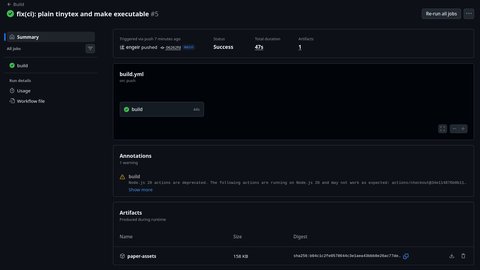
Below we see that CI/CD ran without errors and gave us a paper-assets artifact.
We are now almost ready to submit the manuscript to a journal, but first we will set up
versioning in Git that generates new releases with a changelog.
Git-Cliff is a very flexible and powerful tool for exactly
this, and we configure it with cliff.toml. This file is completely general, with the
exception of the last two lines, shown below. They indicate the owner of the repo and
the name of the repo.
107# limit_commits = 42
108
109[remote.github]
110owner = "engeir"
111repo = "paper-publishing-process"
We can now set a Git Tag on the latest commit to create our first version of the manuscript!
→ See commit bfe67c6.
$ git tag -a v1.0.0 -m "**Release v1.0.0**" -m 'First release!'
$ git push --tags
hk 1.38.0 by @jdx – pre-push – check  [=======================================================] 1/1
✔ files - Fetching files between refs/remotes/origin/main and HEAD (0 files)
✔ bib-filepath

bib-filepath stderr:
[check-bib-filepath] $ #!/usr/bin/env bash
Enumerating objects: 1, done.
Counting objects: 100% (1/1), done.
Writing objects: 100% (1/1), 189 bytes | 189.00 KiB/s, done.
Total 1 (delta 0), reused 0 (delta 0), pack-reused 0 (from 0)
To github.com:engeir/paper-publishing-process.git
 * [new tag]         v1.0.0 -> v1.0.0
And there we have it, our
first release!
It got its name from what we tagged in the Git Tag (v1.0.0), a tag that is completely
arbitrary, but in this case follows the SemVer standard. We could just as well have used
CalVer (e.g. vYYYY.MM.P) v2026.03.0, or something completely custom like rel1. We
can even switch standards; the next version can perfectly follow CalVer even if we used
SemVer in the first release. As long as you stick to a consistent standard, use whatever
feels most natural.
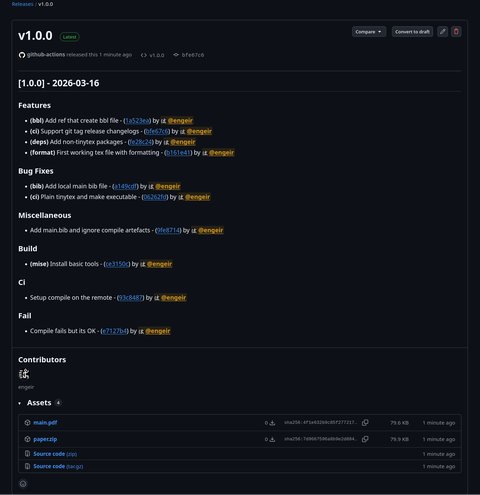
As an attachment (artifact) to the release we have both paper.zip and main.pdf. The
archive paper.zip contains all files specified in .mise/tasks/package, and more
specifically in the Bash array files. It is useful to add all the files needed to
generate the PDF here, so that when uploading to the journal you can easily pick out
all the files from the archive and upload them, instead of hunting through the repo for
every file you need.
git tag command we specified the -a flag (annotation) and two -m flags.
They stand for message, but do not become part of the release text we see in the image
above, since that is generated by Git-Cliff. It will however be visible in Git Tags, see
Tags.Even if we were perfectly happy with the manuscript we will likely get a review back with requests to improve certain passages. This is where the good work we put into Git and versioning really shines.
We create one final mise task: .mise/tasks/setup-revision. →
See commit b490542
(also adds diff*.tex files to .github/workflows/build.yml).
Let’s test it:
$ mise run setup-revision
[setup-revision] $ ~/projects/paper-publishing-process/.mise/tasks/setup-revision
Setting up revision against v1.0.0...
Working on  main.tex
Checking out old dir into: /tmp/01jqEMnfHT/latexdiff-vc-v1.0.0 (rev: v1.0.0)
Running: latexdiff  '--flatten' "/tmp/01jqEMnfHT/latexdiff-vc-v1.0.0/main.tex" "main.tex" > "main-diffv1.0.0.tex"
Generated difference file main-diffv1.0.0.tex

Created:
  tex/diff-v1.0.0.tex   (latexdiff vs v1.0.0)
  tex/review-v1.0.0.tex (review response skeleton using reviewresponse class)
  .mise/tasks/review-v1.0.0/update-refs
  .mise/tasks/review-v1.0.0/compile
  .mise/tasks/diff-v1.0.0/create
  .mise/tasks/diff-v1.0.0/compile

Next: edit review-v1.0.0.tex, then  mise run compile
A full six new files were generated! This includes two TeX files to serve as the response to reviewers and the diff between the previous Git Tag and the new manuscript, as well as four mise task files to compile the two TeX files. These depend on some TeX code we also add:
tex/reviewresponse.cls: the class used by the review documentstex/reviewresponse-extra.sty: extra TeX code that sets up formatting in the review
documentsWrong Git Tag
If at some point you think you are ready to submit the manuscript and create a Git Tag
against the latest commit, but then later realize you need to make further changes, you
can easily move or delete Git Tags. If you do not move a misplaced Git Tag the
setup-revision task will not work as expected, since it would then compare the current
main.tex against a Git Tag pointing to files that were never submitted to the journal.
Git Tags can be deleted with git tag --delete <git-tag>, and attached to a specific
commit with git tag -a <git-tag> <commit-hash> -m "Message".
Let’s now run mise watch compile!
So what is actually happening in the video? The video starts right after I ran
mise run setup-revision which generated the six files for “diff” and “review”. First
in the video mise watch compile is run, which then runs in the background for the
entire video. This single command compiles main.pdf, review-v1.0.0.pdf and
diff-v1.0.0.pdf, and also watches for changes. We then open diff-v1.0.0.pdf and
review-v1.0.0.pdf, before making a change to main.tex. The change becomes
immediately visible in main.pdf and diff-v1.0.0.pdf. Finally we make a change in
review-v1.0.0.tex, which is equally immediately visible in review-v1.0.0.pdf.
The diff between the new main.tex/main.pdf and the one we submitted in version
v1.0.0 can be generated without the file existing locally. Since we have a Git Tag we
simply refer to it, and compare against the file at that point in Git history. This is
the step where we depend on the .bbl files, which contain the compiled (exact)
bibliography that was used to generate the PDFs. This is done in the generated create
tasks with the command
latexdiff-vc --force --git --flatten -r <git-tag> main.tex→ See commit 68d913f for the new files.
Let’s say we are now happy with our latest changes and are ready to submit again to the journal. We again set a Git Tag on the latest commit, push it and wait for the latest version to be prepared for us in a neat format.
Since I personally like CalVer in this context I switch to it now:
$ git tag -a v2026.3.0 -m "**Release v2026.03.0**" -m 'Answer.'
$ git push --tags
hk 1.38.0 by @jdx – pre-push – check  [=======================================================] 1/1
✔ files - Fetching files between refs/remotes/origin/main and HEAD (0 files)
✔ bib-filepath

bib-filepath stderr:
[check-bib-filepath] $ #!/usr/bin/env bash
Enumerating objects: 1, done.
Counting objects: 100% (1/1), done.
Writing objects: 100% (1/1), 189 bytes | 189.00 KiB/s, done.
Total 1 (delta 0), reused 0 (delta 0), pack-reused 0 (from 0)
To github.com:engeir/paper-publishing-process.git
 * [new tag]         v2026.3.0 -> v2026.3.0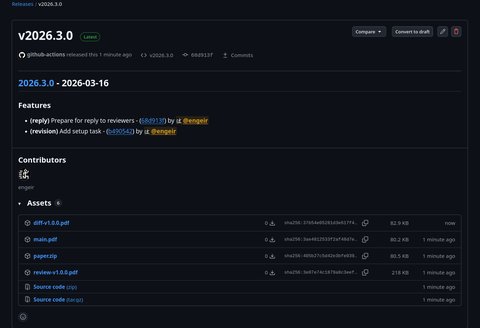
If we now get further rounds of changes from the reviewers, we simply repeat the same process:
mise run setup-revisionmise watch compile: Make all changes to main.tex and review-<git-tag>.tex as we
see fitgit commit ...git tag -a '...' -m '...'git push --tagsHere for example is the output from mise run setup-revision now after I have created
v2026.03.0:
$ mise run setup-revision
[setup-revision] $ ~/projects/paper-publishing-process/.mise/tasks/setup-revision
Setting up revision against v2026.3.0...
Working on  main.tex
Checking out old dir into: /tmp/UxG9Yg13w5/latexdiff-vc-v2026.3.0 (rev: v2026.3.0)
Running: latexdiff  '--flatten' "/tmp/UxG9Yg13w5/latexdiff-vc-v2026.3.0/main.tex" "main.tex" > "main-diffv2026.3.0.tex"
Generated difference file main-diffv2026.3.0.tex

Created:
  tex/diff-v2026.3.0.tex   (latexdiff vs v2026.3.0)
  tex/review-v2026.3.0.tex (review response skeleton using reviewresponse class)
  .mise/tasks/review-v2026.3.0/update-refs
  .mise/tasks/review-v2026.3.0/compile
  .mise/tasks/diff-v2026.3.0/create
  .mise/tasks/diff-v2026.3.0/compile

Next: edit review-v2026.3.0.tex, then  mise run compile
And then mise run compile. Notice review-v1.0.0: skipping, newer revision exists,
and the corresponding for “diff”. Nothing is compiled unless it is truly necessary!
$ mise run compile
[localize-bib-paths] $ #!/usr/bin/env bash
[main:update-refs] $ bibfish -c 'cite,citet,citep,citeA' -f main.tex ../main-ref.bib main.bib
[review-v1.0.0:update-refs] $ ~/projects/paper-publishing-process/.mise/tasks/review-v1.0.0/update…
[review-v2026.3.0:update-refs] $ ~/projects/paper-publishing-process/.mise/tasks/review-v2026.3.0/…
[diff-v1.0.0:create] $ ~/projects/paper-publishing-process/.mise/tasks/diff-v1.0.0/create
review-v1.0.0: skipping, newer revision exists
[diff-v2026.3.0:create] $ ~/projects/paper-publishing-process/.mise/tasks/diff-v2026.3.0/create
diff-v1.0.0: skipping, newer revision exists
[review-v1.0.0:compile] $ ~/projects/paper-publishing-process/.mise/tasks/review-v1.0.0/compile
[diff-v1.0.0:compile] $ ~/projects/paper-publishing-process/.mise/tasks/diff-v1.0.0/compile
review-v1.0.0: skipping, newer revision exists
diff-v1.0.0: skipping, newer revision exists
Working on  main.tex
Checking out old dir into: /tmp/jXriCzZY0z/latexdiff-vc-v2026.3.0 (rev: v2026.3.0)
Running: latexdiff  '--flatten' "/tmp/jXriCzZY0z/latexdiff-vc-v2026.3.0/main.tex" "main.tex" > "main-diffv2026.3.0.tex"
Generated difference file main-diffv2026.3.0.tex
[main:compile] $ latexmk -pdf -g -f -silent -recorder- main.tex
[review-v2026.3.0:compile] $ ~/projects/paper-publishing-process/.mise/tasks/review-v2026.3.0/comp…
[diff-v2026.3.0:compile] $ ~/projects/paper-publishing-process/.mise/tasks/diff-v2026.3.0/compile
Rc files read:
  NONE
Latexmk: Run number 1 of rule 'bibtex main'
Rc files read:
  NONE
Latexmk: Run number 1 of rule 'pdflatex'
Rc files read:
  NONE
Latexmk: Run number 1 of rule 'pdflatex'
This is pdfTeX, Version 3.141592653-2.6-1.40.29 (TeX Live 2026) (preloaded format=pdflatex)
 restricted \write18 enabled.
Latexmk: Run number 1 of rule 'pdflatex'
This is pdfTeX, Version 3.141592653-2.6-1.40.29 (TeX Live 2026) (preloaded format=pdflatex)
 restricted \write18 enabled.
This is pdfTeX, Version 3.141592653-2.6-1.40.29 (TeX Live 2026) (preloaded format=pdflatex)
 restricted \write18 enabled.
entering extended mode
entering extended mode
entering extended mode
Latexmk: Getting log file 'main.log'
Latexmk: Using bibtex to make bibliography file(s).
  ===Source file 'main.bbl' for 'pdflatex'
Latexmk: Getting log file 'diff-v2026.3.0.log'

Latexmk: Using bibtex to make bibliography file(s).
Latexmk: Run number 2 of rule 'pdflatex'
This is pdfTeX, Version 3.141592653-2.6-1.40.29 (TeX Live 2026) (preloaded format=pdflatex)
 restricted \write18 enabled.
entering extended mode
Latexmk: Getting log file 'diff-v2026.3.0.log'
Latexmk: Using bibtex to make bibliography file(s).

Latexmk: Getting log file 'review-v2026.3.0.log'
Latexmk: Missing bbl file 'review-v2026.3.0.bbl' in following:
 No file review-v2026.3.0.bbl.
Latexmk: Using bibtex to make bibliography file(s).
  ===Source file 'review-v2026.3.0.bbl' for 'pdflatex'
Create bibtex review-v2026.3.0
Latexmk: Run number 1 of rule 'bibtex review-v2026.3.0'
Latexmk: Run number 2 of rule 'pdflatex'
This is pdfTeX, Version 3.141592653-2.6-1.40.29 (TeX Live 2026) (preloaded format=pdflatex)
 restricted \write18 enabled.
entering extended mode
Latexmk: Getting log file 'review-v2026.3.0.log'
Latexmk: Using bibtex to make bibliography file(s).
  ===Source file 'review-v2026.3.0.bbl' for 'pdflatex'
Latexmk: Run number 2 of rule 'bibtex review-v2026.3.0'
Latexmk: Run number 3 of rule 'pdflatex'
This is pdfTeX, Version 3.141592653-2.6-1.40.29 (TeX Live 2026) (preloaded format=pdflatex)
 restricted \write18 enabled.
entering extended mode
Latexmk: Getting log file 'review-v2026.3.0.log'
Latexmk: Using bibtex to make bibliography file(s).
  ===Source file 'review-v2026.3.0.bbl' for 'pdflatex'
And this is what the latest release looks like after the final necessary changes were made, ready to be published!
The repo now works fully to both easily prepare a manuscript for submission, and to create a response and diff/change document for any reviewers.
But to make the repo itself a little more inviting it is good practice to also create a README file. With all the releases we have created and their artifacts it is easy to link to files at different stages of the process.
# Paper publishing process

Please see the
[release page](https://github.com/engeir/paper-publishing-process/releases) for the
latest version of the manuscript and the generated PDF.

> [!TIP]
>
> Download the latest release of the manuscript
> [here](https://github.com/engeir/paper-publishing-process/releases/latest/download/main.pdf).
>
> If you want to see the manuscript at the latest commit, download the artefact of the
> last
> [workflow action](https://github.com/engeir/paper-publishing-process/actions/workflows/release.yml).

## More

### Review 1

> All relevant files used for the reply in review 1 can be found in the
> [artefacts of v2026.3.0](https://github.com/engeir/paper-publishing-process/releases/tag/v2026.3.0).

- The paper as it was sent in before review 1 is provided as
  [main.pdf](https://github.com/engeir/paper-publishing-process/releases/download/v1.0.0/main.pdf)
  in v1.0.0, while the current manuscript is available as
  [main.pdf](https://github.com/engeir/paper-publishing-process/releases/download/v2026.3.0/main.pdf).
- The reply to review 1 is provided as
  [review-v1.0.0.pdf](https://github.com/engeir/paper-publishing-process/releases/download/v2026.3.0/review-v1.0.0.pdf),
  and as part of the
  [latest artefact](https://github.com/engeir/paper-publishing-process/actions/workflows/release.yml?query=branch%3Amain).
- The difference file for review 1 is provided as
  [diff-v1.0.0.pdf](https://github.com/engeir/paper-publishing-process/releases/download/v2026.3.0/diff-v1.0.0.pdf),
  and as part of the
  [latest artefact](https://github.com/engeir/paper-publishing-process/actions/workflows/release.yml?query=branch%3Amain).

### Review 2

> All relevant files used for the reply in review 1 can be found in the
> [artefacts of v2026.3.1](https://github.com/engeir/paper-publishing-process/releases/tag/v2026.3.1).

- The paper as it was sent in before review 2 is provided as
  [main.pdf](https://github.com/engeir/paper-publishing-process/releases/download/v2026.3.0/main.pdf)
  in v2026.3.0, while the current manuscript is available as
  [main.pdf](https://github.com/engeir/paper-publishing-process/releases/download/v2026.3.1/main.pdf).
- The reply to review 2 is provided as
  [review-v2026.3.0.pdf](https://github.com/engeir/paper-publishing-process/releases/download/v2026.3.1/review-v2026.3.0.pdf),
  and as part of the
  [latest artefact](https://github.com/engeir/paper-publishing-process/actions/workflows/release.yml?query=branch%3Amain).
- The difference file for review 2 is provided as
  [diff-v2026.3.0.pdf](https://github.com/engeir/paper-publishing-process/releases/download/v2026.3.1/diff-v2026.3.0.pdf),
  or as part of the
  [latest artefact](https://github.com/engeir/paper-publishing-process/actions/workflows/release.yml?query=branch%3Amain).
→ See commit
b3cbc9d for the
changes made to README.md.
We have already set up quite a lot of automation, but we can of course continue even
further. Git-Cliff can be configured to write to a file, typically called
CHANGELOG.md, so that in addition to having changes between versions in each release,
the entire changelog lives in that file.
You can also set up PR-based (pull request) versioning that uses Conventional commits to automatically generate new release proposals. This requires a slightly larger change to the configuration in GitHub CI/CD.
As you may have noticed, all actions used in the GitHub workflow are specified with a long hash, followed by a comment describing which version it points to. This is good practice because, as briefly mentioned earlier, Git Tags are “mutable”; they can be changed and moved. This makes them a potential attack surface, and it is therefore safer to specify the commit hash, since it is “immutable”, unchangeable.
To easily stay up to date with the latest versions you can use
pinact-action, but this will need a
TOKEN with permissions to write to the .github/workflows files.
We have already established that mise-en-place is excellent software, and it can do a little more. Three commands that are useful for having a repo that is both easy to set up and has a well-documented flow:
mise lock
mise generate bootstrap >MISE_BOOTSTRAP.sh
mise generate task-docs >TASKS.md
The first command writes a file with locked versions adapted for installation on all common platforms. The second command generates a shell script that installs the same version of mise-en-place currently in use, while the last command generates documentation for all tasks defined with mise-en-place.
→ See commit 9c1fb30 for files adding functionality for pinning actions versions and mise bootstrapping.